
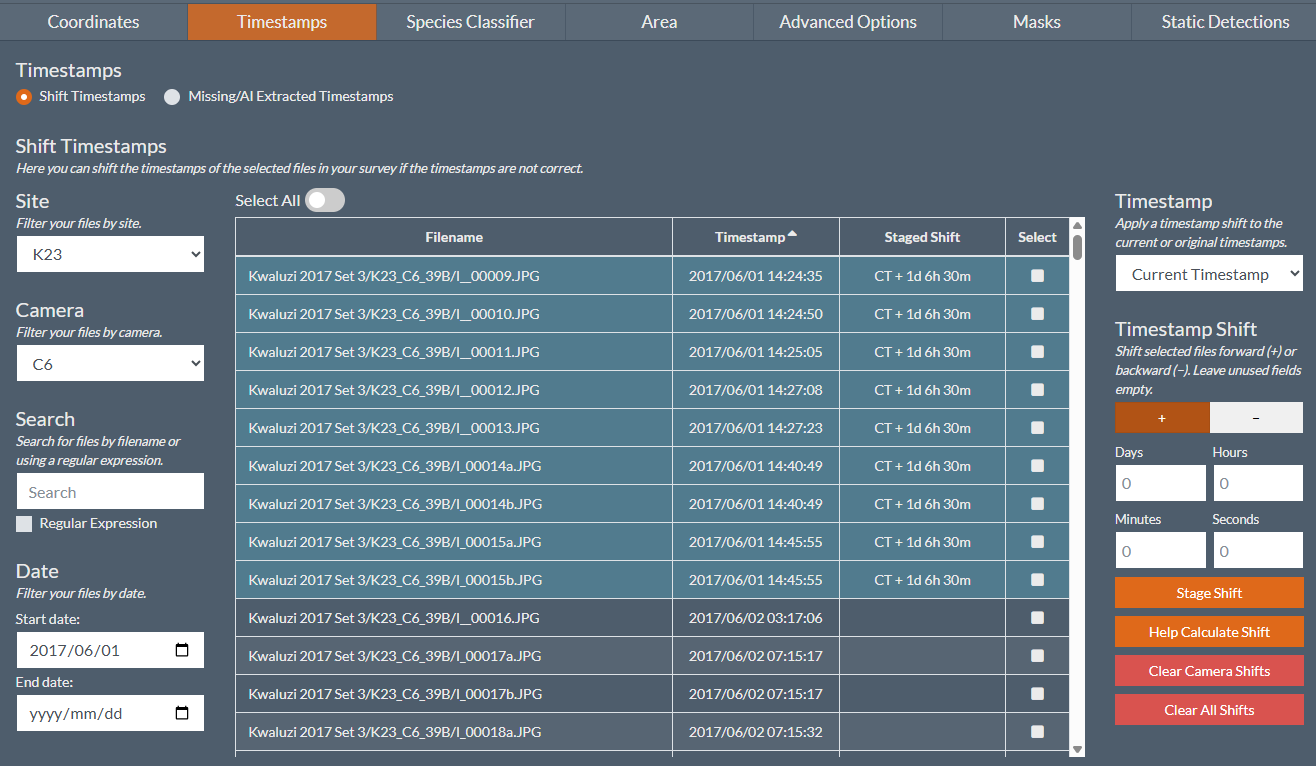
Figure 1: The new timestamp editor allows you to make any shift to any arbitrary combination of files associated with a particular camera.
Historically, timestamp corrections could only be made on a per-camera basis. This worked well for common scenarios where a camera clock had been set incorrectly—for example, when the AM/PM setting was wrong.
However, this approach simply assumes that every image from a particular camera has the same timestamp error, and over the years we have encountered ever more complex scenarios where corrections need to be applied – ranging all the way from cameras being reset in the field mid deployment, through to non-linear clock drift.
To assist our users in tackling these complex scenarios, we have rebuilt the timestamp editor to allow you to select any combination of files from a particular camera and apply either a forward or backward shift to either their original or current timestamp. Moreover, you can filter and select files by:
- Site and camera.
- Filename, including using a regular expression search.
- Date Range – either original timestamp or current timestamp.
- Select and deselect files individually.
Together, this should allow you to make any arbitrary shifts you require.
For consistency, you must specify shifts in days, hours, minutes and seconds. For long or otherwise challenging shifts there is an calculator that will automatically determine the required shift based on a particular file’s current and desired timestamps.
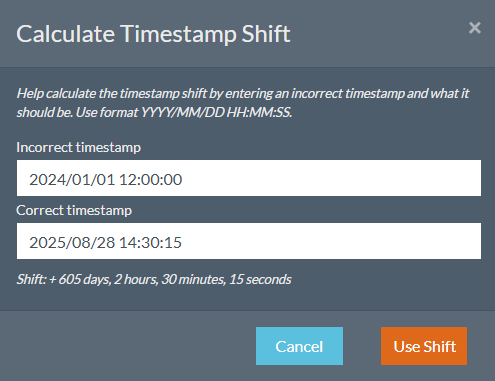
Figure 2: The timestamp shift calculator can help you calculate more challenging shifts.
Please note that any changes to timestamps will often affect your image/file clustering. This changes the context available to the AI for automated species classification, whilst also affecting the context available for human annotation – perhaps a blur with more context becomes identifiable, or an annotator never saw the one species that was incorrectly interleaved into a cluster of another. Therefore, in order to err on the side of caution, all species labels are dropped from modified clusters, and AI species classification re-evaluated.
As such, it is recommended that as far as possible timestamp editing should be performed at the start of your image-processing pipeline to prevent any labels from being dropped. However, should correcting timestamps before manual annotation not be possible, you will simply need to re-label the affected clusters by re-launching your regular species annotation tasks as required.